

Glowing engines on ships when accelerating (like on Boron and Timelines S and M ships)
In this short article i will explain to you what is necessary to have the glowing affect on S- and M-ships when you have no external engine.
First, here a picture of what we´re talking about. Thie glowing affect is turned off on engines while your standing sting. The faster you go, ít becomes more intense.
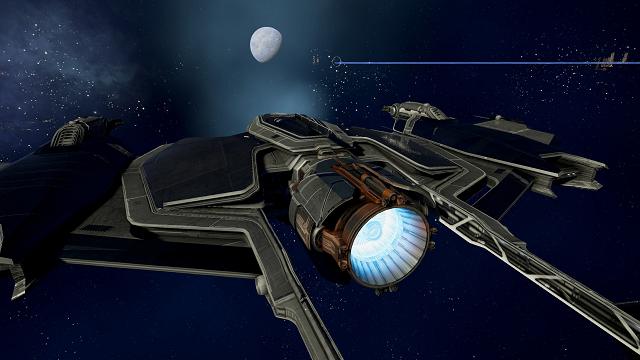
If you want to have this on new engines, you have exactly nothing to do. The game-engine will apply the effect correctly due to the fact that its an engine.
But if you want that effect on a ship, you have to do a few additional steps.
1. Create a material that allows the glow on ships. Therefore you need to add a material_library.xml to you mod.
An example material which is a copy of the "arg_engine_trim_glow" material from the base game:
<material name="arg_engine_trim_glow" shader="P1_complex_surface.fx" blendmode="NONE" preview="none">
<properties>
<property type="BitMap" name="diffuse_map" value="assets\textures\generic\generic_engine_trim_diff" />
<property type="BitMap" name="normal_map" value="assets\textures\generic\generic_engine_trim_normal" />
<property type="Float" name="mat_smoothness" value="1.0" />
<property type="Float" name="mat_metallness" value="1.0" />
<property type="Float" name="diffuseStr" value="1.0" />
<property type="Float" name="diffuse_detail_tiling" value="3.0" />
<property type="Float" name="diffuse_detail_tiling_v" value="3.0" />
<property type="Float" name="diffuse_detailStr" value="1.0" />
<property type="Float" name="diffuse_paintStr" value="1.0" />
<property type="Float" name="normalStr" value="1.0" />
<property type="Float" name="normal_detail_tiling" value="6.0" />
<property type="Float" name="normal_detail_tiling_v" value="6.0" />
<property type="Float" name="normal_detailStr" value="1.0" />
<property type="BitMap" name="color_glow_map" value="assets\textures\argon\arg_engine_trim_glow" />
<property type="Float" name="color_glowStr" value="1.5" />
<property type="Float" name="AnisoX" value="0.5" />
<property type="Float" name="AnisoY" value="0.5" />
<property type="Float" name="Smoothness" value="1.0" />
<property type="BitMap" name="smooth_map" value="assets\textures\generic\generic_engine_trim_smooth" />
<property type="Float" name="Metallness" value="1.0" />
<property type="BitMap" name="metal_map" value="assets\textures\generic\generic_engine_trim_metal" />
<property type="Float" name="color_dirt_tiling" value="1.0" />
<property type="Float" name="color_dirt_tiling_v" value="1.0" />
<property type="Float" name="color_dirtStr" value="1.0" />
<property type="Float" name="use_engineglow" value="1.0" />
</properties>
</material>
Important at this material is the last line:
<property type="Float" name="use_engineglow" value="1.0" />
This line, as the name suggests, allows the use of the engineglow on ships without external engines and was added. Everything else of the material is the same as the source material.
Thats it for the material!
---
On the ship side, you also need to allow the ship to take use of this feature by adding the following parameter to the properties area in the ships macro file:
<glow engine="1" />
You can look up every boron S or M ships for reference.
And thats it. Those two things are required to have the engine glow on ships.